
One of the most common (and important) questions when using Direct Secure Messaging is simple:
“How do I know which Direct address to send to?”
Unlike regular email, Direct Secure Messaging relies on trusted, certificate-bound endpoints, so choosing the right address matters for both delivery and patient safety.
The good news? There are two primary, and complementary, ways to find the correct Direct address.
1. The Organization or Provider Tells You
The most reliable source is often the provider or organization themselves.
They may share their Direct address through:
- A clinical document (like a CDA or FHIR-based exchange)
- A referral, discharge summary, or care coordination message
- Their published contact details in an EHR, portal, their website, or their email signature
What to Look For
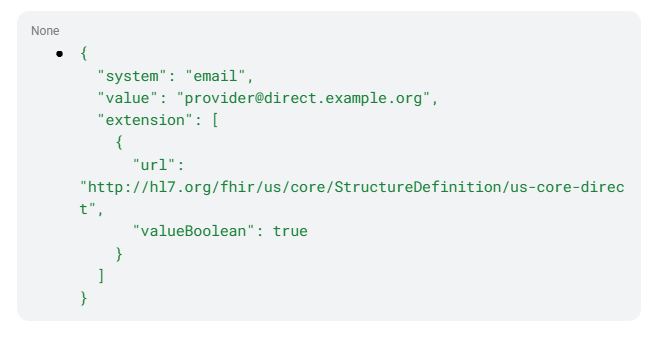
In structured documents, Direct addresses are typically included in telecom/contact fields.
From our companion post on representing Direct addresses, the key patterns are:
- In HL7 CDA R2:

- In HL7 FHIR R4:
Why This Matters
When a provider includes their Direct address in a document they are signaling “this is where you should send information”. The address is often tied to a specific workflow or individual provider. It reflects real-world operational preferences. In other words, if they share their preferred Direct endpoint with you, use it.
2. Look It Up in the DirectTrust Aggregated Directory
If you don’t already have the address, the next best option is to look it up.
The DirectTrust Aggregated Directory is a nationwide directory of Direct addresses contributed by participating HISPs.
What You Can Find
- Provider Direct addresses (individual practitioners)
- Workflow addresses used by a facility (e.g., referrals, intake)
- Associated endpoint metadata information (endpoint use case, associated location, etc.)
Most Direct-enabled systems integrate directory lookup directly into their workflow, allowing you to:
- Search by provider name and/or their National Provider Identifier (NPI)
- Search by organization or facility name
- Filter results based on context
Choosing the Right Address
Sometimes you’ll find multiple Direct addresses for the same organization or the same provider. That’s expected.
What causes multiple Direct addresses to match a query on a facility name or provider name?
When a facility is managed by an Organization getting HISP services from more than one HISP, the facility (a FHIR Location Resource) may appear in the Directory more than once. Each instance may be related to a different Organization Resource that is related to a different HISP. Organization identity currently does not include a legal entity identifier that can be used for deduplication. If a provider uses Direct through different applications – multiple EHRs, or an EHR and an HIE Provider Portal – they may have more than one Direct address because each Direct integration is using a distinct Direct endpoint. Also, a provider may be associated in the DirectTrust Aggregated Directory with Direct addresses that support different use cases.
The Use Case description for each Direct address helps to disambiguate which address to select.
Here’s how to think about it:
SERV_DESC
Each Direct address can have one or more use case labels, called service descriptions. The service description information tells you if the address can be used for any and all types of Direct messages, if the address is intended for sending messages directly to an individual provider, or if the address is designed to support a specialized, well-defined use case, like 360X Referrals.
Individual Practitioner Address vs Workflow Address
When Direct address information is included in CDA, the coded attributes of the address also can provide helpful information for distinguishing which address to use.
- Individual address (DIR)
→ Best when you are communicating with a specific clinician - Workflow / shared address (PUB)
→ Best for the specific use case listed as the service description for the address:- Referrals
- Event Notifications
- Medical records requests
- Intake queues
When in Doubt
- Prefer the address explicitly provided in a document by the provider or their organization
- Otherwise, use the Directory and select the address that best matches your use case
Bringing It All Together
These two approaches are designed to work together:
| Scenario | Best Approach |
| You received a document from the provider | Use the Direct address included in the document for further communications |
| You need to initiate communication | Search the DirectTrust Directory or the NPPES Directory (* see note) |
| Multiple addresses exist | Choose based on the use cases supported by the endpoint as indicated in the DirectTrust Directory |
Why This Matters
Using the correct Direct address:
- Improves delivery success
- Ensures messages reach the right destination
- Supports secure, trusted exchange
- Reduces delays in care coordination
Bottom Line
There are two primary ways to know what Direct address to use:
- Use the address the provider or organization gives you (often embedded in CDA or FHIR documents)
- Look it up in the DirectTrust Aggregated Directory search functions supplied with your implementation of Direct or in the NPPES directory
*Note: CMS requires providers to publish digital contact information in NPPES. The requirement originates from the CMS Interoperability and Patient Access Final Rule (2020). CMS states that providers must include digital contact information such as: Direct addresses, FHIR API endpoints, or other secure exchange endpoints. In practice, Direct addresses are the most widely used way to meet that requirement. Providers without this information in NPPES may be publicly reported. Log in to NPPES to get more information about how to include endpoint information in your NPPES profile.
